
Tilt-Shift Pixel Art: Depth of Field and Bloom Without Smearing a Pixel
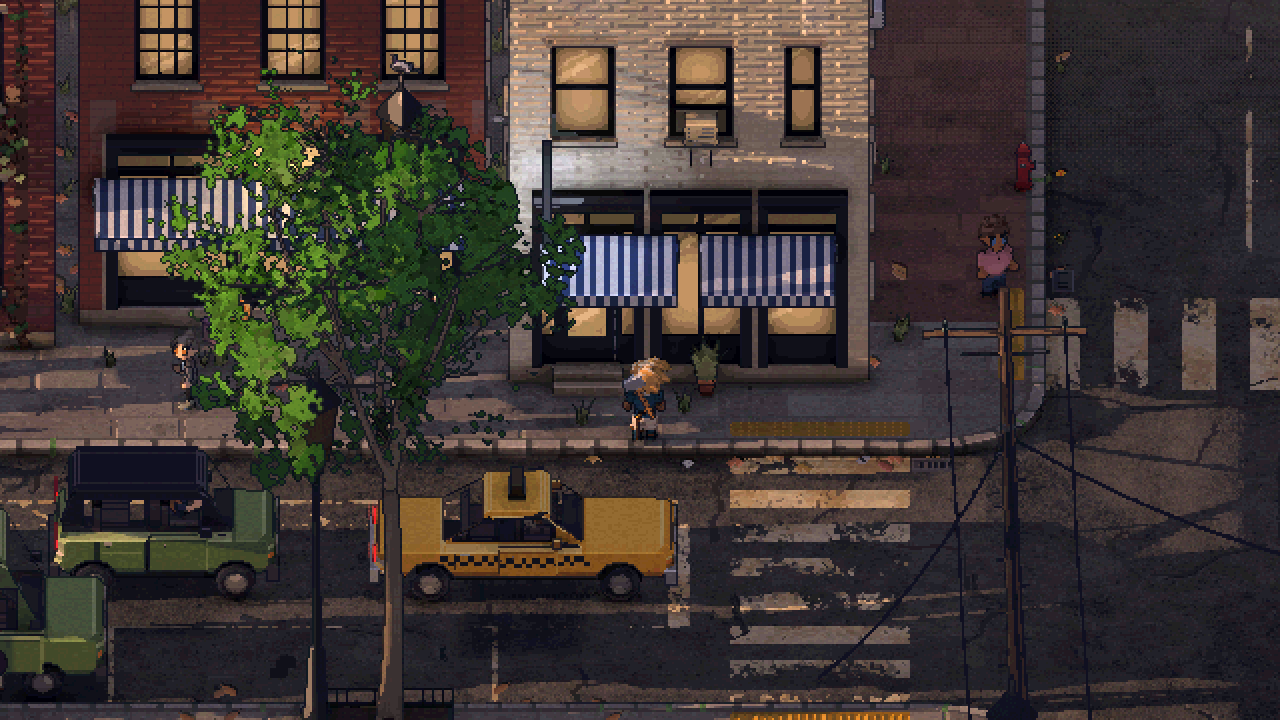 Pixels
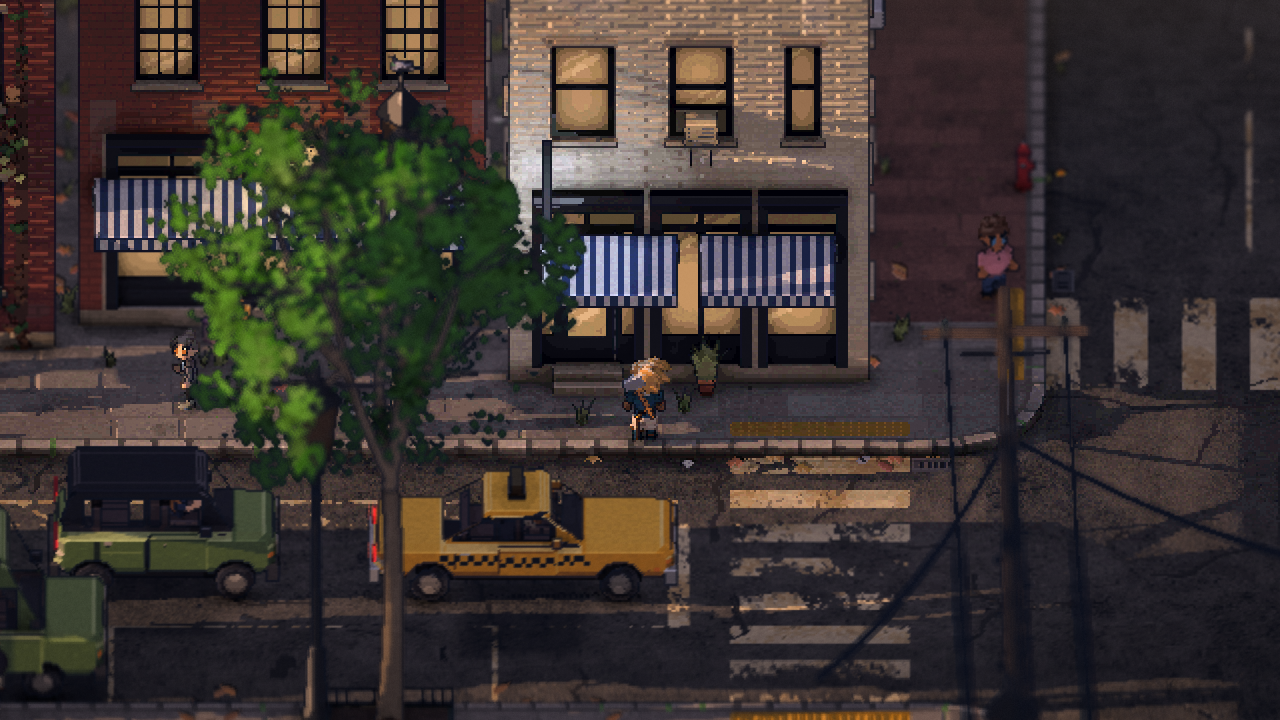 Lens
Once the pixel-art city is drawn, Philadelphia Fiefdom adds a few things at your screen's full resolution: a tilt-shift depth of field that keeps the street round you sharp, a faint vignette, and a lens layer of bloom, warm halation and fine grain. They're drawn after the pixel art is finished, on the scaled-up picture, so they sit on top of the pixels instead of becoming part of them. The street in focus is still exactly on its grid. It just looks like a camera is filming it.
Last time was the people, cats and pigeons who live on the street. This one's back to the look, and to the glass between you and the city.
Why draw anything at full resolution over pixel art?
Because I wanted the city to feel like a miniature you're looking at through a camera, not a screenshot scaled up.
The game started out with a CRT filter over everything: scanlines, an aperture grille lined up one stripe per game pixel, and a halation glow round bright lights. I liked the glow. The rest kept fighting the pixel grid. Curvature and grain bent the grille against it and made fine detail shimmer as the view scrolled, so I'd already switched those off. Early in October I turned the whole filter off, and a few days later I deleted it.
What I'd actually wanted from it was the feeling of light coming through glass. That's what this layer is. The difference is where it's drawn: not on the game's pixels, but on your screen's, after the pixel art is done.
Why not blur in big pixels?
My first depth of field, in mid-October, did it the pixel-art way. Anything well above the player's floor was drawn in bigger pixels: blocks of 2x2 from 9 meters up, 3x3 from 18, each block the average of its pixels and locked to the world's grid so it held still as the view scrolled.
It looked like a mosaic, not a lens. A day later it was gone.
How does the tilt-shift depth of field work?
The game renders its small canvas with a transparent background, and uses the alpha channel for something else: how far each pixel is from the depth of the player. Halfway is sharp. Toward one is nearer, toward zero is farther. A pass over the view writes that for every pixel.
Then, when the canvas is scaled up to your screen, the display pass uses those numbers to blur:
- The street round you stays sharp. Those pixels are drawn exactly as they are, one color per pixel, untouched.
- Near things spread. Something soft and close, like an awning between you and the camera, spreads over what's behind it, the way a lens does. Its edge melts into the street instead of standing as a hard outline.
- Far things blur with what's as far. A distant tower blurs only with things at its own distance. A sharp lamppost in front of it never gets smeared back into it.
- Bright points become discs. A street lamp or a lit window out of focus is drawn as a disc of its light with a defined edge, not a dim smudge.
What changed when I reworked it?
When I rebuilt the game the depth of field came across as it was. On October 26 I went back and rebuilt it properly, after reading how GPU Gems 3 and Call of Duty do it.
- Two layers. The near layer holds what's soft and nearer than the focus, each pixel laid over its neighbors by its share of its blur disc. The far layer holds soft far pixels blurred only with what's as far, plus the street filled in behind near things, which is what shows through their soft edges.
- Read pixel by pixel. Both layers read the canvas one pixel at a time, never interpolated. A sample that was half a lamppost and half street had been the root of hard, stair-stepped silhouettes. A soft near thing's edge now fades over its whole blur, about 20 screen pixels at 4K where it was 8.
- Blur that grows with distance. Before, there was a sharp band and the blur was capped at under 2 pixels, so a tower was no softer than the far curb. Now the blur grows steadily with distance from the focus, up to 4.5 pixels.
- No seam. A dark line used to run across the ground where it left the sharp band. The near layer's empty pixels were black, and smoothed onto the screen they darkened the edge. It's premultiplied now, and the line is gone.
- Outlines fade with it. The one-pixel outlines and glints fade as the blur grows, so a soft building isn't wearing a sharp ink line.
It came out a little faster than before: the median frame at 4K dropped slightly.
How fast is it on a Steam Deck?
Too slow at first. The two layers were worked out at twice the canvas's size, and on the Deck they cost 6.4 ms a frame. But their samples were already reading whole canvas pixels, so the bigger buffers only bought half-pixel offsets that the screen's smooth scaling gives for free. At the canvas's own size they take 1.7 ms, and side by side the picture is the same.
The next day I took more off. The blur's 48 sample offsets became a fixed table instead of a square root, a sine and a cosine per sample per pixel, and the near layer is skipped wherever no 8x8 block in reach holds anything near and soft. In a busy daytime street the two passes went from 1.89 to 1.44 ms.
What's in the lens layer?
The lens layer went in the same day as the rework. It's the camera's glass, not the world's light. The world's own glow round lamps is drawn in hard rings on the pixel grid by the post pass. This is drawn smooth, on top:
- Bloom. A quarter-size pass gathers what's bright, from 8x8 canvas pixels at a time, so a lamp that's a single pixel never slips between samples. By day only the very brightest things bloom, so a sunlit roof doesn't glow like a lamp.
- Halation. An eighth-size pass spreads that wider, in a warm orange-red, like the fringe round a light on film.
- Color fringing, only in the blur. Red and blue are taken a little from opposite sides of each blur disc, more toward the corners. It's never on the sharp pixels.
- Grain. Animated film grain on its own fine grid, a third of a canvas pixel, changing on the game's fast animation clock. It sits mostly in the mid tones and in the soft parts, and only faintly on what's in focus.
I also tried a soft horizontal streak off the brightest lights, like an anamorphic lens. It lasted about an hour.
Why doesn't it smear the pixels?
Because of the order things happen in. The city is drawn at the canvas's size, with its toon bands, outlines and color steps, and finished. It's scaled up by a whole number. Only then are the depth of field, the vignette and the lens drawn, at the screen's resolution.
The vignette darkens the picture toward its corners, 16% at most, and it's applied after the color steps, so it fades smoothly instead of in bands. Bloom and halation add light round bright things, but nothing in focus is blurred, fringed or moved, and only a third of the grain lands there. The pixels in focus come out where they went in.
Quick answers
Can I turn it off? Yes. Depth of field, the vignette and the lens effects are each their own switch in Options. All three are on by default.
Does the blur follow the player? Yes. The sharp band sits at the player's depth, wherever they go.
Is it the same for both players? Each player's screen is focused on their own character.
Follow along
Philadelphia Fiefdom is an online co-op sandbox in a city laid out after Philadelphia. Last time was the life on the street. Next, the shader that draws the pixels under all this: one toon shader for the whole city. Join the playtest list to play it early, or come say hi on Discord (opens in a new tab).